Definitions
Exception: Abnormal event disrupting normal program flow. Throwable superclass with Error and Exception branches.
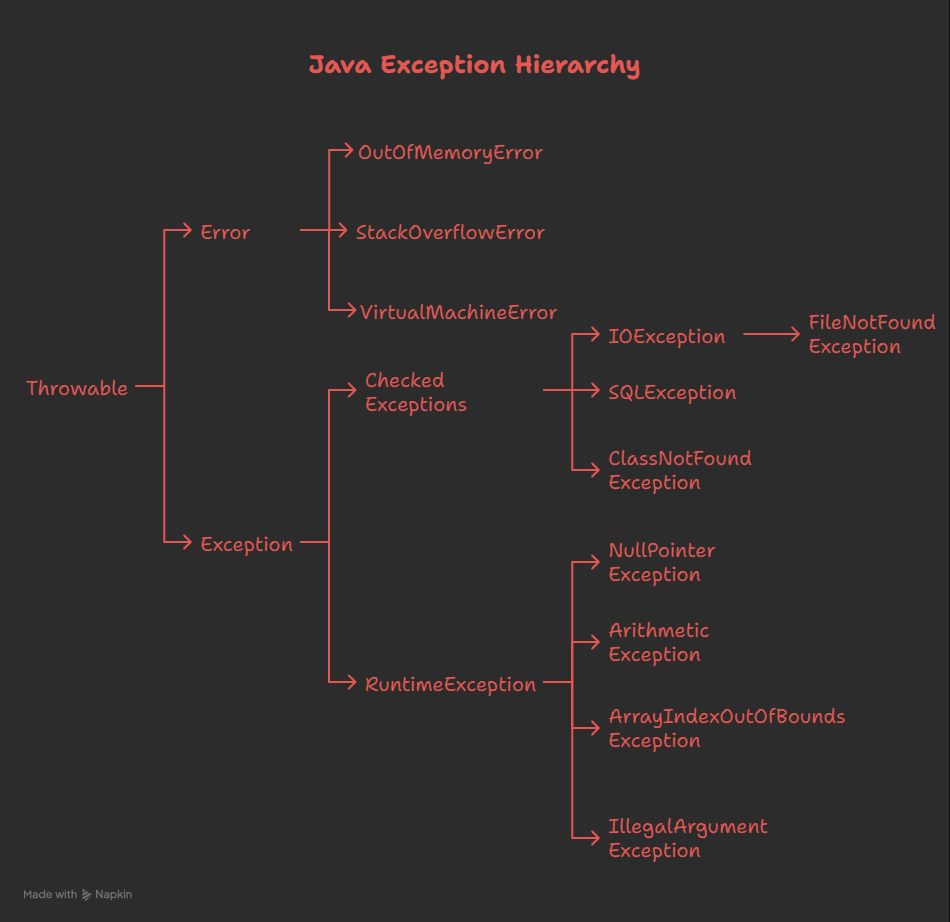 Checked Exception: Must be caught or declared with throws. Compiler enforces handling. Examples: IOException, SQLException, FileNotFoundException.
Unchecked Exception: Runtime exceptions; compiler doesn’t enforce handling. Extend RuntimeException. Examples: NullPointerException, ArithmeticException, ArrayIndexOutOfBoundsException.
try-catch-finally: Blocks for exception handling. try=monitored code, catch=handling, finally=cleanup (always executes except System.exit()).
throws Keyword: Declares method may throw exceptions. Caller responsible for handling. Allows exception propagation up call stack.
QnA
What’s the difference between checked and unchecked exceptions?
Checked exceptions must be caught or declared in the method signature using the throws keyword—the compiler enforces this handling. Examples include IOException and SQLException, which occur due to external factors. Unchecked exceptions extend RuntimeException and represent programming errors that ideally shouldn’t occur with proper code, such as NullPointerException or ArrayIndexOutOfBoundsException. The compiler doesn’t enforce handling for unchecked exceptions. Use checked exceptions for recoverable errors; use unchecked for programming mistakes.
Can you have try without catch or finally?
Yes, Java 7+ allows try-with-resources syntax for handling AutoCloseable resources without needing catch or finally blocks. However, traditional try statements must have at least a catch block or finally block (or both). Try-with-resources automatically closes resources even if exceptions occur, providing cleaner syntax than manual try-finally blocks.
Does finally always execute?
Yes, the finally block executes after try and catch blocks in virtually all scenarios. The only exceptions are: calling System.exit() explicitly terminates the JVM before finally runs, a JVM crash, or the thread being terminated forcefully. In normal circumstances, finally provides reliable cleanup code. Note that if catch or try contains a return statement, finally still executes before that return occurs.
What happens if both catch and finally contain return statements?
The finally block’s return value overrides the catch block’s return value. Whatever value or exception the finally block returns/throws becomes what the caller receives. This can lead to unexpected behavior if not understood, so it’s generally discouraged to return from finally blocks. If you need to handle exceptions before returning, do so in catch; let finally only perform cleanup.
Can you throw exceptions in finally?
Yes, you can throw exceptions in finally blocks, but doing so will override any exception from try or catch blocks. If you want to preserve both exceptions, use exception chaining: catch the original exception, then throw a new exception with the original as the cause using new ExceptionType("message", originalException). This preserves the exception stack trace.
What’s try-with-resources?
Try-with-resources (Java 7+) automatically closes AutoCloseable resources like streams and connections. Syntax: try (ResourceType resource = new Resource()) { }. The resource is automatically closed when the try block exits, whether normally or via exception. This eliminates the need for manual try-finally blocks with resource.close() calls, reducing code and preventing resource leaks.
Code Examples
Example - try-catch-finally:
try {
    int[] arr = {1, 2, 3};
    System.out.println(arr[10]);  // ArrayIndexOutOfBoundsException
} catch (ArrayIndexOutOfBoundsException e) {
    System.out.println("Array index out of bounds: " + e.getMessage());
} catch (ArithmeticException e) {
    System.out.println("Arithmetic error: " + e.getMessage());
} catch (Exception e) {
    System.out.println("General exception: " + e.getMessage());
} finally {
    System.out.println("Cleanup code always runs");
}
Example - Multiple Catch Blocks (Most specific first):
try {
    // Code that may throw exceptions
    methodThatThrows();
} catch (FileNotFoundException e) {
    // Most specific exception
    System.out.println("File not found: " + e);
} catch (IOException e) {
    // More general exception
    System.out.println("IO error: " + e);
} catch (Exception e) {
    // Most general exception
    System.out.println("General error: " + e);
}
Example - throws Declaration:
public void readFile(String filename) throws IOException {
    FileReader reader = new FileReader(filename);
    // IOException not caught; delegated to caller
}

public static void main(String[] args) {
    try {
        readFile("file.txt");
    } catch (IOException e) {
        System.out.println("Cannot read file: " + e);
    }
}
Example - try-with-resources (Java 7+):
// Automatically closes BufferedReader
try (BufferedReader br = new BufferedReader(new FileReader("file.txt"))) {
    String line;
    while ((line = br.readLine()) != null) {
        System.out.println(line);
    }
} catch (IOException e) {
    System.out.println("IO error: " + e);
}
// br automatically closed, even if exception thrown
Example - Custom Exceptions:
public class InvalidAgeException extends Exception {
    public InvalidAgeException(String message) {
        super(message);
    }
}

public void validateAge(int age) throws InvalidAgeException {
    if (age < 0 || age > 150) {
        throw new InvalidAgeException("Age must be between 0 and 150");
    }
}

// Usage
try {
    validateAge(200);
} catch (InvalidAgeException e) {
    System.out.println("Invalid age: " + e.getMessage());
}
Example - Exception Chaining:
try {
    // Some operation
} catch (SQLException e) {
    // Preserve original exception while adding context
    throw new ApplicationException("Database error occurred", e);
}

public class ApplicationException extends Exception {
    public ApplicationException(String message, Throwable cause) {
        super(message, cause);
    }
}
Key Points
- Exception Hierarchy: Throwable is root, with two branches: Error (system errors) and Exception (application errors). RuntimeException is unchecked; others are checked.
- Catch Order: Arrange catch blocks from most specific to least specific exceptions. Compiler warns if less-specific catch comes before more-specific one (unreachable code).
- Resource Leaks: Always use try-with-resources for AutoCloseable resources (streams, connections, readers). Prevents forgetting close() calls and ensures cleanup even on exceptions.
- Empty Catch Blocks: Never leave catch blocks empty or just print stack traces. Log appropriately or re-throw with context. Silent failures are debugging nightmares.
- Custom Exceptions: Extend Exception for checked exceptions (recoverable errors); extend RuntimeException for unchecked (programming errors). Provide meaningful messages and constructors accepting causes.