Definitions
Array: A fixed-size, ordered collection storing elements of the same type in contiguous memory. Accessed via zero-based index.
Array Declaration: Syntax: dataType[] arrayName; or dataType arrayName[];. Creates reference; memory allocated with new.
Array Initialization: Can initialize at declaration: int[] arr = {1, 2, 3, 4, 5}; or dynamically: new int[size].
Multi-dimensional Array: Arrays of arrays. Syntax: int[][] matrix = new int[3][3];. Can have jagged dimensions.
Default Values: Numeric arrays default to 0; boolean to false; objects to null.
QnA
How do you declare and initialize an array?
Arrays can be declared as int[] arr = new int[5]; for dynamic allocation with default values, or int[] arr = {1, 2, 3, 4, 5}; for immediate initialization with values. The first approach creates an array of 5 elements all initialized to 0; the second creates an array with explicit values. Choose based on whether you know the values at compile time.
Can you change an array’s size after creation?
No, arrays have fixed length determined at creation time. The length is immutable and cannot be changed. If you need dynamic sizing, use Collections like ArrayList, which internally manages array growth. Arrays do provide the fixed-size guarantee which makes them efficient for known-size scenarios.
What’s the difference between array index and length?
Index is the position of an element in the array, using zero-based numbering (0 to length-1). Length is the total number of elements in the array. For example, an array of length 5 has valid indices from 0 to 4. Accessing any index outside this range throws ArrayIndexOutOfBoundsException.
How do you copy an array?
Use Arrays.copyOf(source, length) to create a new array with specified length, copying elements from the source. Alternatively, use System.arraycopy(source, srcIndex, dest, destIndex, length) for more control over copy positions. Both are more efficient than manual loops, especially for large arrays.
What happens with jagged arrays?
Jagged arrays are arrays of arrays with potentially different row lengths. Declare as int[][] jagged = new int[3][];, then initialize each row separately with different sizes: jagged[0] = new int[2]; jagged[1] = new int[5];. This provides flexibility when different rows need different column counts, unlike regular multidimensional arrays with uniform dimensions.
What exception occurs with invalid array index?
ArrayIndexOutOfBoundsException is thrown when accessing an index less than 0 or greater than or equal to the array’s length. For example, accessing arr[10] on a 5-element array throws this exception. Always validate indices before access or use enhanced for-loops to avoid this error.
Code Examples
Example - Array Declaration & Initialization:
// 1D Array
int[] numbers = new int[5];           // Default: all 0
int[] initialized = {10, 20, 30, 40, 50};
System.out.println(initialized[0]);   // 10

// Accessing and modifying
numbers[0] = 100;
System.out.println(numbers[0]);       // 100

// Array length
System.out.println(initialized.length); // 5
Example - Multi-dimensional Array:
// 2D Array (Matrix)
int[][] matrix = {
    {1, 2, 3},
    {4, 5, 6},
    {7, 8, 9}
};
System.out.println(matrix[0][0]);     // 1
System.out.println(matrix[2][2]);     // 9

// Jagged array (varying row lengths)
int[][] jagged = new int[3][];
jagged[0] = new int[2];
jagged[1] = new int[3];
jagged[2] = new int[1];
Example - Array Iteration:
int[] arr = {10, 20, 30, 40, 50};

// Traditional for loop
for (int i = 0; i < arr.length; i++) {
    System.out.println(arr[i]);
}

// Enhanced for-loop (for-each)
for (int num : arr) {
    System.out.println(num);
}

// Stream API (Java 8+)
Arrays.stream(arr).forEach(System.out::println);
Example - Array Utilities:
int[] numbers = {5, 2, 8, 1, 9};

// Sorting
Arrays.sort(numbers);
System.out.println(Arrays.toString(numbers)); // [1, 2, 5, 8, 9]

// Copying
int[] copy = Arrays.copyOf(numbers, numbers.length);
int[] partial = Arrays.copyOfRange(numbers, 1, 4);

// Searching (works on sorted arrays)
int index = Arrays.binarySearch(numbers, 5); // Returns index

// Filling
Arrays.fill(numbers, 0);  // Set all to 0

// Comparing
int[] arr1 = {1, 2, 3};
int[] arr2 = {1, 2, 3};
boolean equal = Arrays.equals(arr1, arr2); // true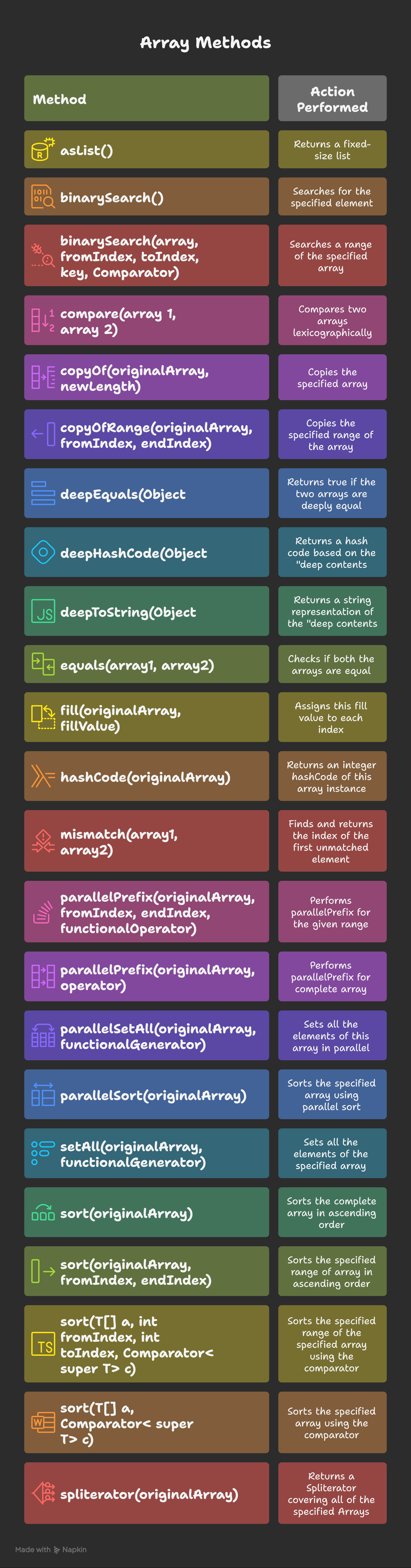
Key Points
- Array Index: Zero-based; accessing out of range throws ArrayIndexOutOfBoundsException. Always validate indices.
- Array is Reference: Variable holds reference to array object on heap; passing array to method passes reference to same object.
- Array Performance: O(1) access by index; O(n) search without sorting; O(n log n) after sorting.
- Memory Layout: Elements stored contiguously in memory for cache efficiency and fast access.
- String Array:
String[] strings = new String[5];defaults to null values, not empty strings. - Primitive vs Object Arrays: Primitive arrays store values directly; object arrays store references to objects on heap.